Float or Sink - Cool Science Experiment

From the video, we know that the presenter use hands-on science and inquiry-based to make learning more engaging and fun. The instructional design that he use is Behaviorism because he is showing to the viewer on how to make an experiment to see whether the cans float or sink.

Advantages of behaviorism; 1.Behavior is shaped quickly.

2.The leaner adapts to the environment.

3. Behavior can be measured.

4. Initially teaching machines were crude and cumbersome, but now programmes can be run on personal computers.

5.Student works at own pace. Disadvantages of behaviorism; 1.It does not account for all kinds of learning.

2. It does not explain some learning,research has shown that animals adapt their reinforced patterns to new information.

3. Whole class teaching does not suit slow or fast learners, just the average paced learners.

4.Analysis of a child’s behaviour takes time and involves careful observation and record keeping.

Tuesday, October 30, 2012

Week 7 - Testing & Evaluation

Welcome back..

Today we learn how to do some testing and evaluate a multimedia project in proper way.
Here are some infos about the testing and evaluating
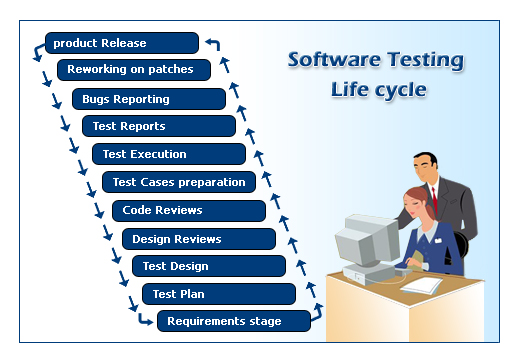
What should you evaluate?

Students, instruction, process

Evaluating your multimedia educational materials ultimately is the process of engaging not just with the question, "How well did the students learn?" but also with the question, "How much of the students' learning is due to the multimedia educational materials you've created?" Newby et al distinguish evaluating the students from evaluating the instruction (in our case, instruction can refer specifically to multimedia materials). Techniques for evaluating student performance is a large topic and beyond the scope of this course. You can evaluate how well students learn by measuring changes in knowledge through assessment (Level 2 in Lee & Owen's Table 25.1) or by evaluating how their real-world performance has been affected (Level 3 in Lee & Owen's Table 25.1, also p. 193). Another area that Newby et al touch on is evaluating how well students use multimedia to generate material (such as portfolios and blogs) which you can assess. This is a very interesting and very relevant topic which is also beyond the scope of our course; see Newby et al's reference list on page 253 as a starting point for assessing student-generated multimedia.

You might also need to evaluate the development process itself. Take the case of a workplace training intervention. After you have deployed the instruction, evaluated student performance, made predictions or actually observe changes in worker performance, and kept track of all the development costs, you might evaluate the return on investment for the company. (Evaluating ROI is Level 4 in Lee and Owen's Table 25.1)

For this course, we are interested in evaluating the multimedia educational material itself, not the students nor the process, so let's look at some ways in which we can do that.
 

When you should evaluate?


Techniques for evaluating usefulness

Techniques for assessing usefulness are discussed by Newby et al, which include the following:
  • Use pre- and post-tests to determine the effectiveness of the materials
  • Use student tryouts to determine the effectiveness, efficiency, and appeal
  • Use direct observation to determine the effectiveness and efficiency
  • Talk to students to determine appeal and effectiveness
  • Ask a colleague to review the materials
  • Ask a colleague to observe how the learners use the tool during deployment

Tuesday, October 16, 2012

Week 6 - Project Need Analysis Presentation

Our lecturer ask all groups to come up with the need analysis for our projects.
These are examples of need analysis that we can use.
He also taught us about the flowchart and how to create one to show the flow of some process


Tuesday, October 9, 2012

Week 5 - Visual Design

Visual Design is about utilizing the power of these items;
1. graphic
2. multimedia
3. video
4. colour
5. shape
6. text
The graphic designer need to be creative and consistent when delivering the best they can in producing the visual design needed. This is important because visual design that attractive and interesting can attract pupils and viewers to explore more.

Tuesday, October 2, 2012

Week 4 - Information to Interaction

Assalam and hi everybody.

Today I run into the class about 5.00 pm due to having a course by PPD Kulai about VLE (Virtual Learning Environment) for school.

We learn about storyboard and types of storyboard that people often used in their multimedia project.

Then we learn about Information to Interaction.

There are 3 basic elements that need to be considered in interactivity;
1. Organization
2. Navigation
3. Interactivity.

Tuesday, September 25, 2012

Week 3 - Multimedia Courseware Design

Last week, we have been exposed to an explanation about the topic which is Project Management in Multimedia Design and Production. We learn about the function of each members in a multimedia production team.

This week we learn about the development and the design of multimedia. There are four items that need to be stressed out to make the multimedia design meaningful which are;

1. content.
2. technology
3. visual
4. economy

We must also make sure that every product development must follow the correct procedure in orderly manner to ensure the project meet the requirements and standards that had been determined by the head of project.

There are also 3 important steps in developing multimedia projects that need to follow which are;
1. flow chart - strategy and content management
2. storyboard - interaction, navigation and control
3. prototype - for early presentation that later on need to be criticize by expert for RnD purposes.

Friday, September 21, 2012

Week 2 - Project Management In Multimedia Design And Production

This week we learn about the different tasks that the multimedia production team have when they wanted to build any task. We have been told that there are many  team roles that need to be understand in order to produce better productions;

In short, we have to make sure that we planned and distributed all the tasks according to their expertise to ensure we make full use of the expert that we bring in our team.

If we planned well, then there will be many more interesting opportunity to come.

Tuesday, September 11, 2012

Week 1 - Introduction to CD ROM Based Multimedia Development

Assalam. Hi everybody.

Nice meeting all of you. Here some glimpse about me as a second semester student in Education Technology Faculty of UTM. My name is Ayatul Kauthar Bin Basemin @ Baseman. I'm working as a teacher cum ICT Coordinator in SK Taman Sri Pulai, Kulaijaya. A married man with 3 children, I'm still trying to manage my timetable to fit the schedule and datelines for my assignments. I'm teaching English language at my school for Year 4 pupils.

Since this is my first week in class, so I do hope I can catch up with environment and syllabus according to the schedule.

We learn about our first chapter which is ,"Multimedia Development Process" with Puan Norasykin, our lecturer for today's class.